


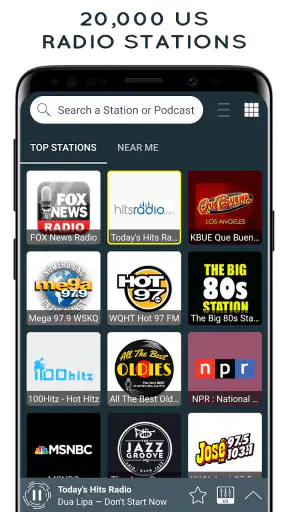
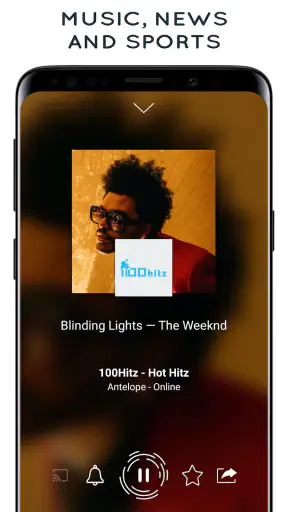
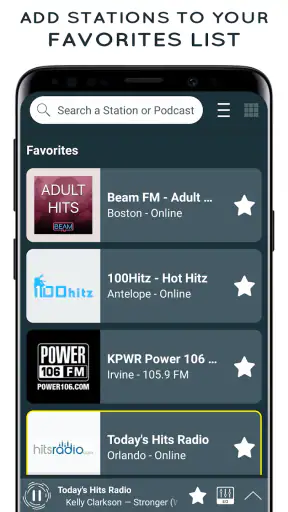
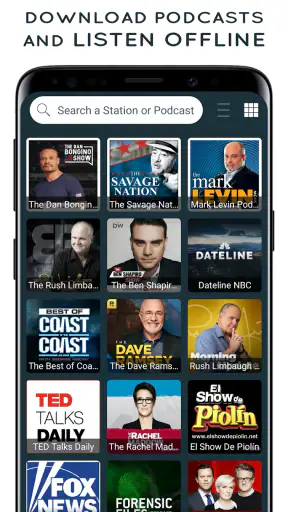
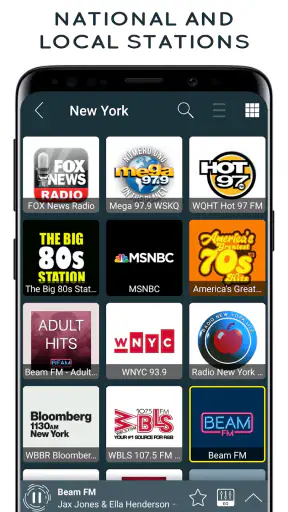
I tested Radio USA - Live Radio FM / AM as a shared listening app rather than treating it as just another station directory. That distinction matters. In a household, a radio app is often opened by different people for completely different reasons: one person wants background music while cooking, another wants a familiar talk station during breakfast, and someone else wants quick audio without building a playlist. My overall impression is that this app is most useful when the goal is immediate access to live AM and FM-style radio, not personal music discovery or an ad-free streaming library.
It belongs to the Music & Audio category and is developed by Radio FM Online Free. The app is free to install, which makes it easy to try on a spare phone or a shared tablet before deciding whether it deserves a regular place in the household. Its broad appeal is reflected in a 4.7 average from around 28 thousand ratings, while more than a million installations suggest that it has found an audience beyond occasional experimentation.
How it works when several people share one device
The simplest household scenario is also the one where this app makes the most sense. Imagine a tablet in the kitchen: I can open the radio during breakfast, another family member can switch to a different live station later, and nobody needs to prepare a playlist or transfer downloaded files. That immediacy is the central strength here. The app is designed around listening to live radio, so it fits moments when people want something already programmed rather than a carefully selected queue.
That shared-device role also exposes an important trade-off. A live radio app is not the same as a family music service. It does not replace a personal library, and it is not the best choice when every listener wants separate recommendations, saved albums, or tightly controlled playback. On a common device, the current station is effectively the current household choice. That can be convenient, but it can also create small disagreements when one person expects music and another expects conversation or news.
I found the app most natural for low-effort listening: filling silence while doing chores, keeping a familiar station running in the background, or giving visitors something to hear without handing over a personal account. It is less suitable for a long car journey where I need dependable offline playback, or for a child who needs a carefully filtered selection. Those situations call for a different kind of audio product.
What to decide before putting it on a shared phone
Because the app is free, the first setup decision is not financial; it is about where it belongs. On a personal phone, it can sit alongside headphones and other audio tools. On a shared tablet, I would place it where everyone can reach it without confusing it with a private music service. That small distinction helps set expectations: this is a communal live-radio tool, not an individual profile with separate listening histories.
The current version is 4.2.30, and it runs on devices using Android 8.0 or later. Before installing it on an older household handset, I would check the operating system first. Compatibility is particularly important with shared devices because they are often kept in service longer than personal phones. If the tablet cannot run the app, its free price does not help.
The age context deserves attention too. The app carries a Teen content rating. I would not interpret that as a promise that every live station is appropriate for every younger listener. Radio programming can vary by station and by time, and a general live-radio directory does not automatically become a child-focused listening environment. In a household with children, I would make the station choice myself and explain that the app gives access to broadcasts rather than a fully curated kids’ catalog.
There is also a practical account boundary to consider. I would avoid treating a shared installation as though it were a private personal space. If several people use the same device, everyone should understand that the app is being used collectively. That matters when one person changes the station, leaves audio playing, or decides whether any optional purchase is worthwhile. A clear household rule is more useful here than pretending the app offers family management features that are not part of its confirmed description.
Making station changes less disruptive
Coordination is where a little routine improves the experience. I would agree on a few situations for the shared device: a regular station during breakfast, another choice for background listening, and headphones when someone wants a private broadcast. This is not a feature inside the app; it is a sensible way to use a live station app without turning every change into a negotiation.
The best workflow is to decide the station before starting a task, rather than repeatedly browsing while everyone is waiting. If I am cooking, I would open the app, select the intended broadcast, and leave the screen alone. If another person needs the device for something else, stopping the radio first avoids the familiar problem of audio continuing unexpectedly in the background. Live radio is effortless once it is running, but it still benefits from a little shared-device etiquette.
Another useful habit is to keep expectations realistic about live content. A station may be ideal for one part of the day and less appealing later, because the programming changes. That is a reason to judge the app by access and convenience rather than assuming a single station will always sound the same. For household use, flexibility is more valuable than becoming attached to one permanent choice.
I would also separate ordinary listening from purchases. The app is free, but in-app purchases are listed at prices ranging from $19.99 to $34.99 per item. That is a meaningful difference from the installation price, especially on a device used by several people. Before anyone taps a purchase option, the household should agree on who is responsible and whether the benefit is worth paying for. On a shared device, accidental or impulsive spending is not just a personal decision.
Age, trust, and the limits of a live broadcast directory
The Teen rating makes the app easier to place than an unrated audio tool, but it should still be treated as guidance rather than a substitute for supervision. I would feel comfortable introducing it to a teenager who understands how live stations work and can switch away from unsuitable programming. I would be more cautious with a younger child using it alone, especially if the device is in a common room and the radio may be left playing without anyone checking the station.
This is also where the app differs from curated music services. A playlist service usually gives me more control over exactly what starts next. A live-radio app offers the appeal of a broadcast schedule, but that means less control over the next song, presenter, topic, or advertisement. For adults, that unpredictability can be part of the charm. For younger listeners, it can be a reason to choose a more tightly managed alternative.
I would explain the difference plainly to a child: the app opens a live station, not a private collection selected only for them. That conversation is more useful than promising a perfectly predictable experience. It also helps teenagers understand why a station change may be necessary if the current program is not suitable for the room.
Trust matters for adults sharing a device as well. One person may prefer talk radio, another may want music, and neither preference is wrong. The app works best when it is treated as a common utility instead of a battleground for personal listening habits. If everyone wants an individualized experience, separate headphones and separate services will probably be less frustrating.
Where it beats the usual alternatives
Compared with a music library app, this one has a clear advantage when I want live programming without spending time assembling a queue. Radio has its own rhythm: presenters, scheduled segments, unexpected songs, and the feeling that other people are listening at the same time. That makes it a good companion for routine household activities where I want sound in the room but do not want to manage every track.
Compared with a traditional physical radio, the app is more flexible for a modern shared device. I can use it on a compatible Android phone or tablet instead of needing a separate radio unit in each room. That can be useful in a small apartment, a temporary living arrangement, or a kitchen where counter space is limited. The convenience depends on the device being available, charged, and connected well enough for live listening, so it does not eliminate every advantage of hardware radio.
Compared with a podcast app, the difference is even more pronounced. Podcasts are usually chosen episode by episode and can be paused for later. Radio is more spontaneous and less predictable. I would choose this app when I want a station to carry the room, but I would choose podcasts when I need a specific subject, a known duration, or control over where I resume.
Compared with a subscription music service, the free entry point is attractive, but the trade-off is control. A subscription service is usually better for a listener who wants exact songs, albums, downloads, and personal recommendations. Radio USA is more convincing for someone who values live AM/FM-style listening and does not want to build a personal catalog for every session.
Small habits that make the experience better
My first practical tip is to use it for defined listening windows rather than leaving it running by default all day. Starting the app for breakfast, a cleaning session, or an evening in the living room makes the shared purpose clear and reduces the chance that someone walks into a room where an unwanted broadcast has been playing for hours.
My second tip is to choose stations according to the activity, not only according to personal loyalty. A talk-heavy broadcast may work during a quiet morning but become distracting while several people are speaking. Music may be better for chores, while spoken programming may suit a single listener with headphones. Thinking about the room makes the app more useful than simply selecting the first familiar station.
My third tip is to treat the device as a handoff point. Before passing the phone or tablet to another person, I would stop the current broadcast or tell them what is playing. That avoids confusion and gives the next listener a clean choice. This sounds minor, but shared audio becomes much smoother when nobody has to guess whether the previous user intended the station to continue.
A fourth trade-off is worth remembering: live listening can feel more social, but it is less forgiving than on-demand audio. If the household schedule is interrupted, the broadcast continues without waiting. For a person who often gets called away, an on-demand alternative may be more practical. For someone who enjoys the feeling of tuning into a station at the right moment, that same limitation can make the app feel pleasantly simple.
Who should install it, and who should skip it
I would recommend this app to adults, couples, roommates, and families who want quick access to live radio on an Android device. It is especially suitable for a shared kitchen or living-room tablet, for listeners who enjoy AM/FM-style programming, and for anyone who prefers discovering what a station is broadcasting instead of selecting every item manually.
I would be less likely to recommend it to someone whose main requirement is offline playback, exact song selection, private profiles, or a carefully controlled children’s catalog. It is also not the first choice for a household where every person wants a separate listening identity on the same device. In those cases, a dedicated music, podcast, or child-focused service would provide better control.
The free installation lowers the risk of trying it, but the optional purchase range means I would use it for a while before considering any paid item. A shared household should be particularly deliberate: first confirm that the available live-radio experience fits everyone’s routine, then decide whether an optional purchase adds enough value to justify its cost.
For a teenager, I would present it as a live broadcast app with adult guidance around station selection. For an adult who simply wants background radio, I would present it as a convenient replacement for reaching across the room to find a separate radio. Those are different use cases, and the app succeeds more clearly in the second one.
My household verdict
After using it with shared-device habits in mind, I see Radio USA - Live Radio FM / AM as a straightforward tool for live audio rather than a complete answer to every household listening need. Its strongest quality is immediacy: open it, choose a broadcast, and let the station provide the structure. That makes it useful when several people share a room and nobody wants to manage a playlist.
The limitations are equally important. Live content is not fully predictable, personal listening boundaries are not the app’s main focus, and younger users may need an adult to help choose appropriate stations. The in-app purchase range also deserves a deliberate conversation before anyone spends money on a shared device. These are not reasons to dismiss it, but they do shape where it belongs.
With more than a million installations and a strong 4.7 average, it has clearly earned attention from a large audience. My own recommendation is conditional but positive: install it if your household wants free, live AM/FM-style radio and can agree on how a common device will be used. Skip it in favor of on-demand or child-focused alternatives if control, privacy, offline listening, or precise content selection matters more than the simple pleasure of tuning into a broadcast.
The best reason to choose it is not that it replaces every audio app; it is that it gives a shared room an easy, familiar stream of live radio. Used with sensible boundaries, that is a useful role, and the app handles that role better than it handles highly personalized listening.


